

How it works
All your agents' output, one workspace.
Run Claude Code, Codex, Cursor Agent and more side by side on Windows and Linux, tell them what you want, and see what each one is doing.
Pro is $15/month or $144/year (Founder price $99/year until December 25). No free plan. Uses the AI subscriptions you already have. See pricing
Voice to prompt
Talk as much as you want. There's no word limit.
Voice prompts are unlimited. Speech-to-text runs on your own PC, so there's nothing to count: no minutes, no word caps, no credits. Hold your voice key, say what you want, let go. Your words land in the prompt box, or the terminal panel you're in, ready to check before you send.
- Hold to talk. Release to drop the text in, press Esc to cancel. Nothing is sent until you say so.
- Your key, your call. Ctrl+Space out of the box. Change it to any key or combination you like in Settings.
- Transcribed on your PC. Speech-to-text runs on your own computer, downloaded once. No audio goes to us.
- Unlimited, included in Pro. No minutes, no word caps, no credits. The fine print: up to 5 minutes per hold, as many holds as you like, in English.
- Works everywhere in the app. The prompt box, any terminal panel, any page. Start with "new agent, …" to hand it to a fresh agent.
Click around. It's the real interface. Sample project; nothing leaves your browser.

What's inside
One window for every agent you run.
Your agents do the building. Technically Not keeps them in one place, shows what each is doing, and gets out of your way.
Unlimited voice prompts
Hold a key, say it, let go. Your words land where you're typing. It runs on your PC, so there's no meter. How it works
The agent tree
Overview draws your agents as a tree: each lead, its sub-agents, and what every one is doing right now.
Real terminal panels
Every agent CLI runs in its own terminal panel, up to 12 per workspace. Any panel can run PowerShell too.
Live status
Working, needs you, idle: pushed the moment it changes, with a task clock and tokens for Claude Code and Codex.
Agents that delegate
A lead agent on Claude Code, Codex or OpenCode can hand parts of the job to sub-agents on any of those or Cursor Agent, and gets their results back. Cursor Agent works as a sub-agent, not as a lead.
Files in motion
See which files your agents are changing as they work, and click any one to read it.
Live preview
See your app on a desktop, tablet or phone screen, or all three side by side, right beside your terminals. Click any part of the page to ask an agent about it.
Workspaces per project
Named workspaces keep each project's agents together. Switch projects and the others keep running in the background.
Just shipped
What's new in 0.3.62
A few of the changes in this release, shown in the demo above. See the full changelog
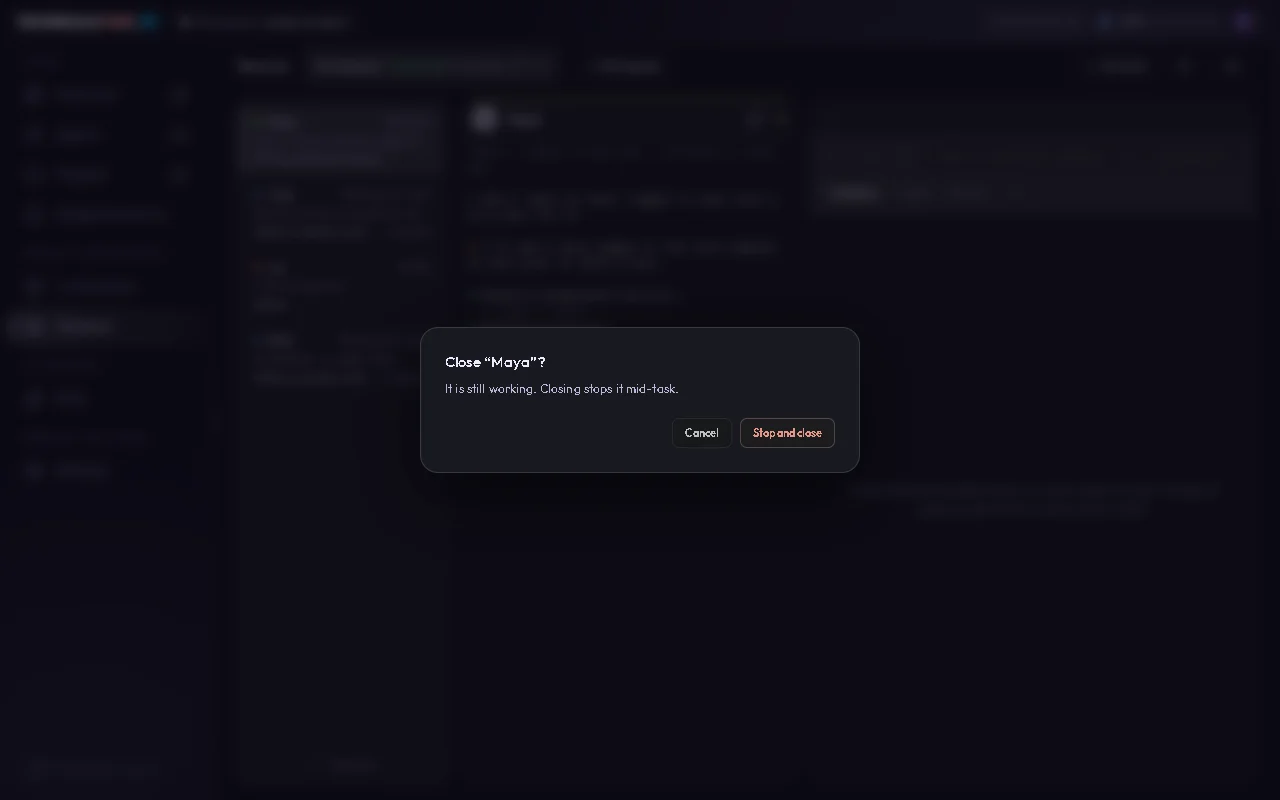
Closing an agent asks first
Click the × on a terminal panel that has a session and Technically Not asks before it closes, so a stray click no longer ends an agent in the middle of its work.
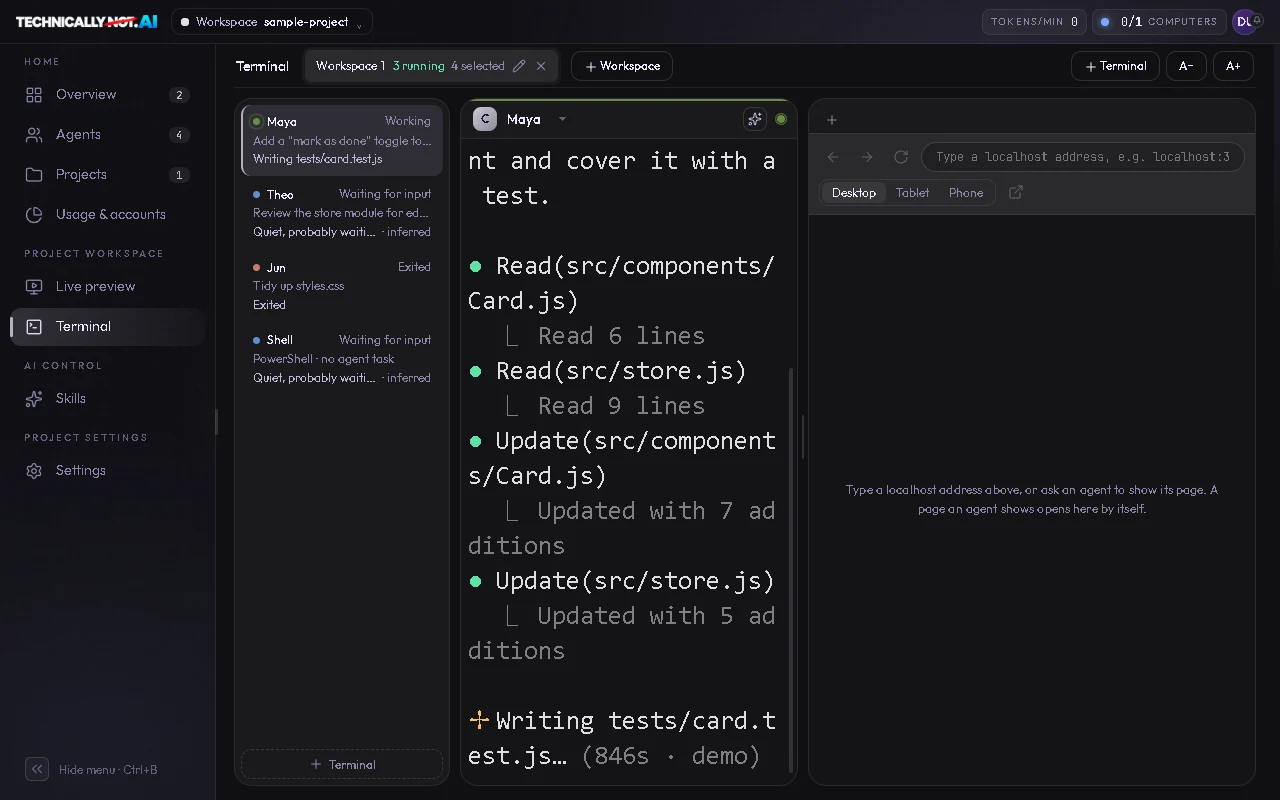
Bigger terminal text
A+ now takes terminal text up to 36 px, for a big monitor, a screen share or tired eyes.
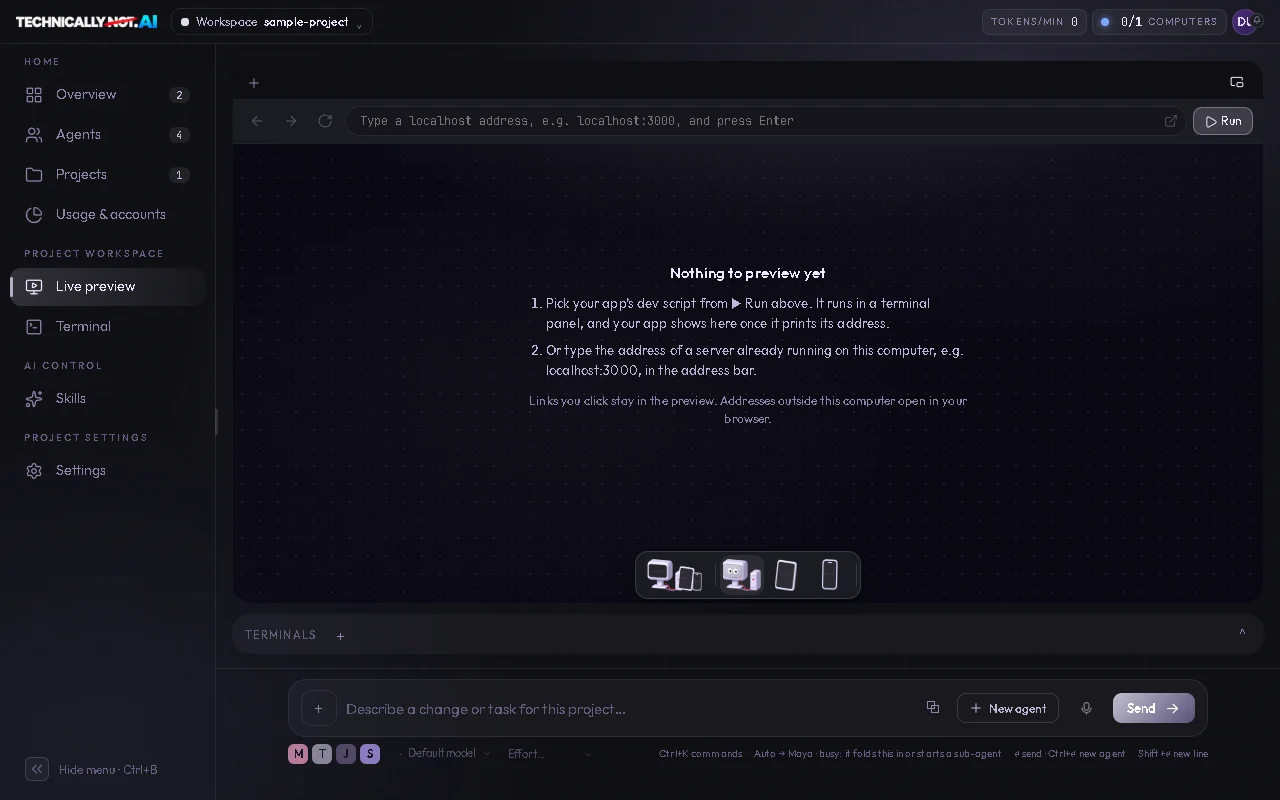
Live preview fills the space
The Desktop view now always fills the preview area and grows when you stretch the window. And after a reload it no longer pulls the page back up while you scroll.


Things you'd think you need
Every one of them: technically not.
You need to be a developer.
Technically not. Say what you want in plain words. The agents write the code.
You need to live in a terminal.
Technically not. Run several agents at once, each in its own panel, without memorizing a command.
You need to watch every window.
Technically not. Live status shows who's working and who needs you.
You need to be a computer person.
Technically not. That's kind of the point.
How it works
Open a folder. Start your agents. Say what you want.
No new AI to learn: Technically Not runs the agent CLIs you already use and shows you what each one is up to.
Open a project folder.
Your code stays on your PC.
Start your agents.
Claude Code, Codex, Cursor Agent and more, side by side.
Say what you want.
Plain words, not syntax. Then watch who's working and who needs you.
Accounts
Hit your limit? Technically not stuck.
Add every Claude Code and Codex account you have: work, personal, a client's. When one runs out, move the agent to another and it carries on with the same conversation.
- Add your accounts.Each one signs in through its own provider. We never see a password.
- Pick one per agent.Set a default for new sessions, or choose when you start one.
- Limit reached? Switch.The app spots the limit message, you pick another account, and the conversation resumes where it stopped.
Who it's for
Complexity is available, not mandatory.
- Got an idea, not a CS degree
- You don't have to be technical.
- Vibe coding already
- Turn vibe coding into an actual workflow.
- Developer
- You don't have to give up control to work faster.
Your code stays on your PC. No telemetry by default. Privacy details
Do I need my own AI subscriptions?
Yes. Technically Not runs the agent CLIs you install and sign in to yourself, on your own plans. It never asks for your passwords or sign-in tokens. For Claude Code and Codex, you can also bring your own API key instead of a plan, kept encrypted on your computer.
Do I need to know how to code?
No. You say what you want and the agents write the code. Setup means installing at least one agent CLI and signing in.
Which agents does it work with?
Claude Code and Codex have the fullest support. Cursor Agent and OpenCode work with fewer features (Cursor Agent can be a sub-agent but can’t lead other agents). GitHub Copilot CLI has basic support: it launches in a panel, without sign-in checks or resume. Gemini CLI, Antigravity CLI and Droid can be launched too, but are experimental and not yet tested. Any panel can also run PowerShell. See how to run Claude Code and Codex together.
Can I switch Claude Code accounts when I hit a limit?
Yes. Add several Claude Code or Codex accounts, and when one hits its usage limit the agent moves to another and resumes its conversation when the CLI can. How it works and its limits: switching Claude Code accounts.
Can I use my own API key?
Yes, for Claude Code and Codex. Add your Anthropic or OpenAI key as an account in Settings › Accounts, pay per use to the provider, and switch to it when a plan hits its limit. The key stays encrypted on your computer and is never sent to Technically Not's server.
Is voice really unlimited?
Yes. Speech-to-text runs on your own PC, not on our servers, so there's nothing to count and nothing to bill: no minutes, no word caps, no credits. The speech model downloads once (about 150 MB), and your audio never leaves your PC. The fine print: each hold records up to 5 minutes (hold again to keep going), and it understands English. It comes with Pro; there's no free plan.
What are the requirements?
Windows 10 or 11 (64-bit), or Linux x64/arm64 (AppImage or .deb), and one agent CLI, installed and signed in. Git is optional. Mac is coming soon.
Does my code leave my PC?
Not through Technically Not. The agents you run talk to their own providers, the same as they do outside the app.
Can I get a refund?
See our Refund Policy.
Technically not a developer.
Still built it.
Windows 10 or 11, or Linux (x64/arm64), 64-bit; Mac coming soon. Bring one agent CLI you're signed in to.
Community
Technically Not builders.
Show what you built, ask questions, follow along. #BuiltItAnyway